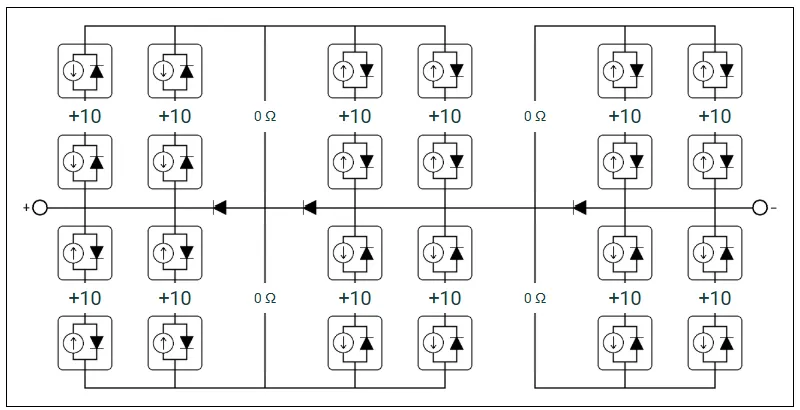
Module electrical layout
The electrical layout defines how cells within a module are wired together. This includes the circuit topology (how strings of cells are connected), connector row configuration, bypass diode configuration, and any additional resistive or short-circuit components. These inputs are found in the Electrical circuit section of the Inputs → Module tab.
The physical cell arrangement (cell shape, dimensions, spacing, and cell groups) is configured in the Geometry section of the same tab and is described on the module cell layout page.
Circuit type
Section link: Circuit typeThe Type dropdown in the Circuit layout panel determines the fundamental wiring topology used to connect cells within the module. The following options are available:
-
Vertical strings: The standard layout for crystalline silicon modules. Cells are arranged in columns, with each column divided into substrings of series connected cells. Connector rows separate the substrings and define the bypass diode protection zones. This is the default and most commonly used option.
-
Horizontal strings: A layout where cells are connected in series within horizontal strings, with multiple strings connected in parallel. This is commonly used for thin-film modules.
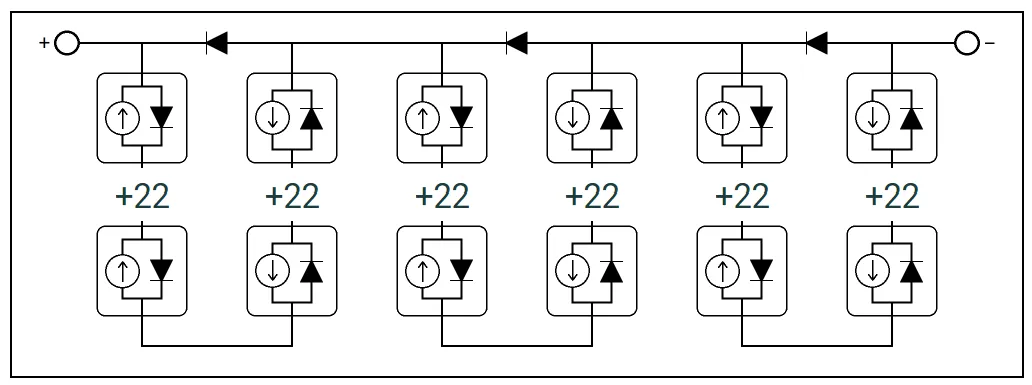
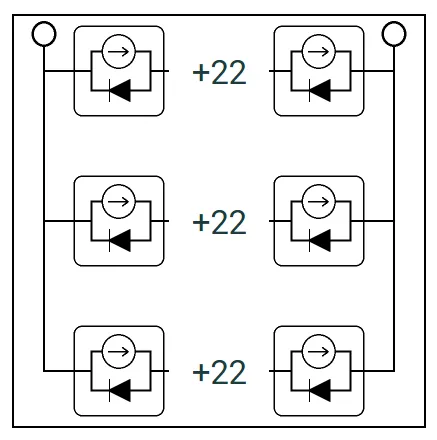
Left: Vertical strings — cells are wired in series within vertical columns. Right: Horizontal strings — cells are wired in series within horizontal rows.
Once the circuit type is defined, the circuit may be further edited as described below. Changing the circuit type will reset the layout to its simplest form.
Adding and removing columns
Section link: Adding and removing columnsFor the Vertical strings layout, extra electrical columns can be inserted or removed from the circuit:
- Check Add columns to display ”+” buttons at insertion points between existing columns
- Check Remove columns to display ”−” buttons on existing short-circuit columns
These columns represent additional current paths in the circuit (e.g., for modelling interconnection busbars or alternative wiring schemes). Each of the additional columns has a new set of active rows that can be configured as described below.
Connector rows
Section link: Connector rowsFor the Vertical strings circuit type, the Connector rows input is shown in the Circuit layout panel. This defines the number of horizontal connector rows in the circuit, which determines how the column of cells is divided into substrings.
A module with connector rows has substrings per column.
For example, the figures below show two common configurations for a 6-column module. On the left, the layout has 2 connector rows with a single substring of cells in each column. On the right, there are 3 connector rows, dividing each column into 2 substrings.
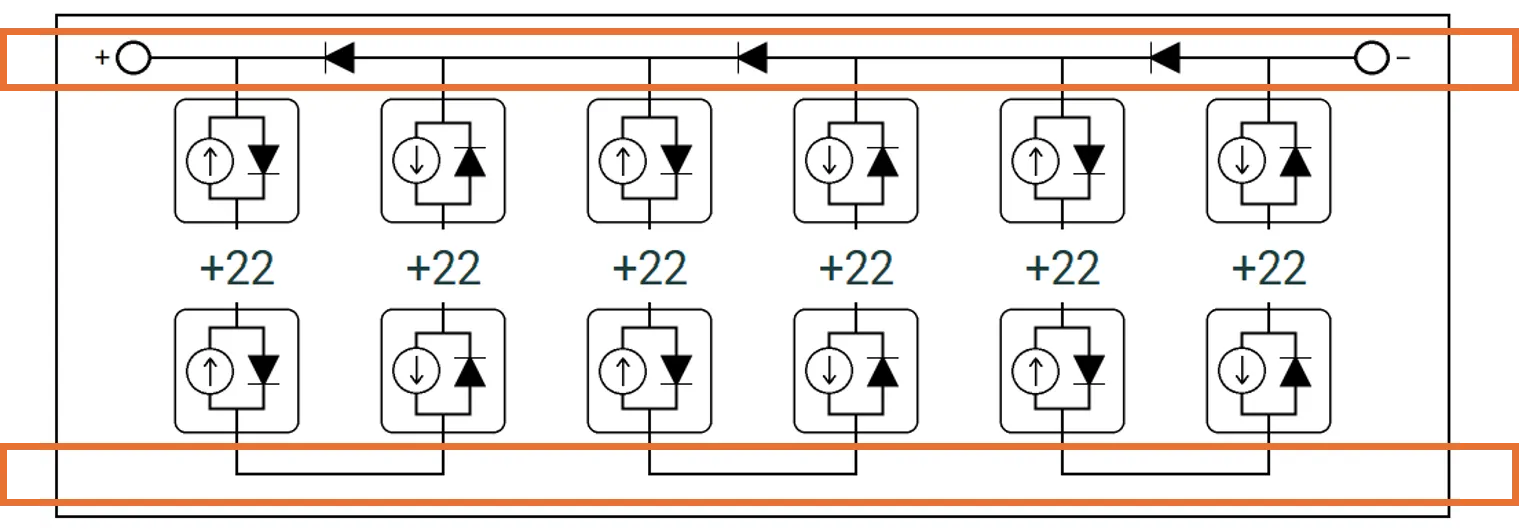
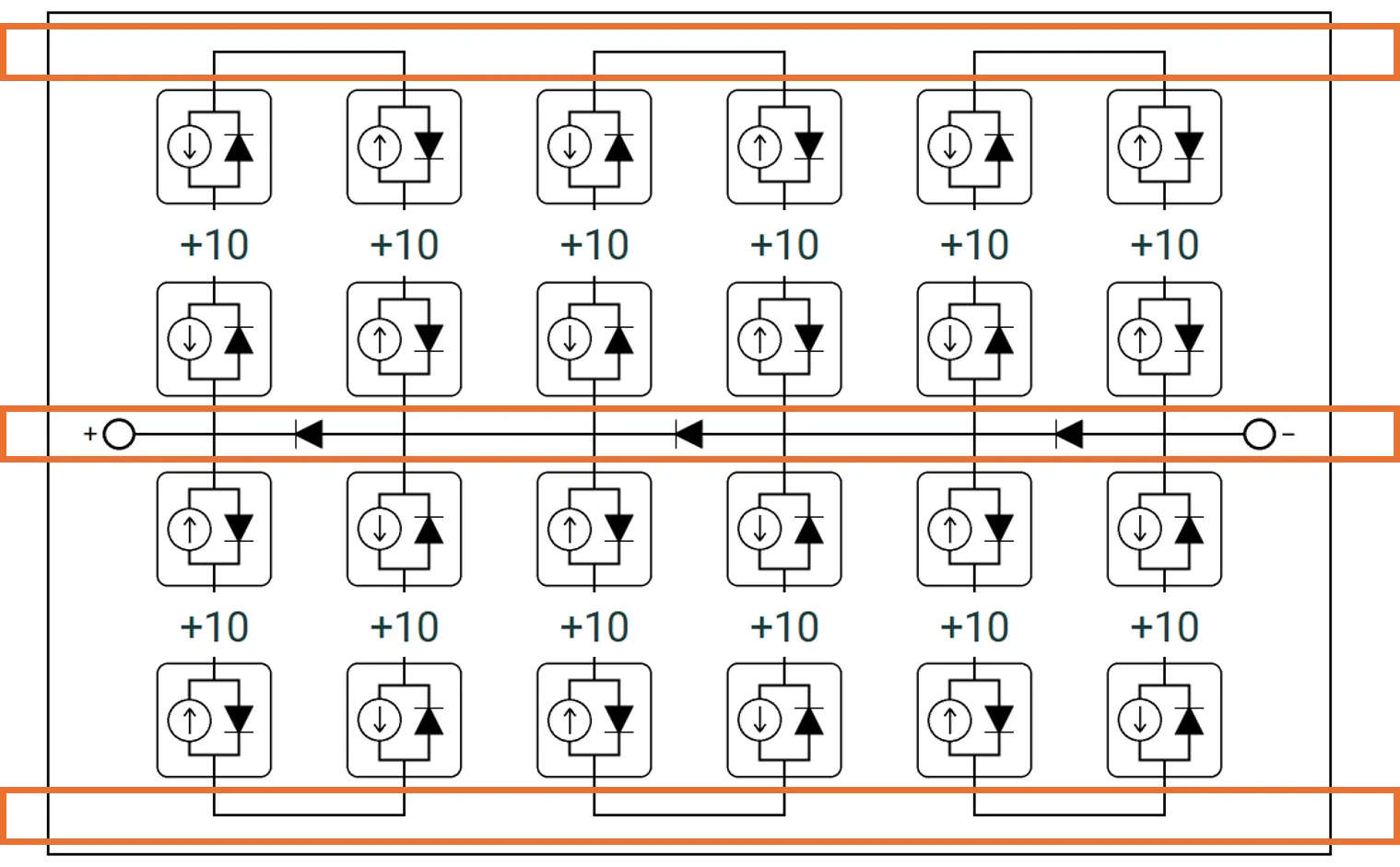
Left: 2 connector rows (highlighted in orange) — each column has 1 substring. Right: 3 connector rows (highlighted in orange) — each column is divided into 2 substrings, with a bypass diode protecting each substring.
The value is adjusted using increment/decrement buttons. The minimum value is 2 (no split). The maximum value is the rows of cells in the module + 1.
Within each connector row, a component sits between each pair of adjacent columns. Clicking on an interior connector selects it for editing — see connector components below. The leftmost and rightmost columns contain terminal controls instead (see terminals below).
Connector components
Section link: Connector componentsClicking on an interior connector in the circuit diagram selects it, highlighted with an orange border. An editor panel appears below the circuit diagram with the following controls.
Component type
Section link: Component typeThe Type dropdown sets the electrical behaviour of the selected connector. The available options are:
-
Bypass diode ← / Bypass diode →: The connector acts as a bypass diode. The arrow indicates the current flow direction through the diode under forward bias. The diode uses the same model parameters configured in the Bypass diodes section.
-
Open circuit: The connector is electrically disconnected — no current flows through it.
-
Resistor: The connector acts as a purely resistive connection. The Resistance input is fixed to a value of 0 Ω reflecting a short-circuit condition.
Clicking the selected connector again deselects it and hides the editor panel.
Active rows
Section link: Active rowsEach substring between connector rows is an active row. A module with connector rows has active rows per column. The cells in each column are distributed as evenly as possible across the active rows. If the number of cells cannot be evenly divided, the extra cells are assigned to the top active rows.
The figures below show the active rows (highlighted in green) for two configurations of a 6-column module. On the left, each column has 1 active row containing all the cells. On the right, each column is split into 2 active rows.
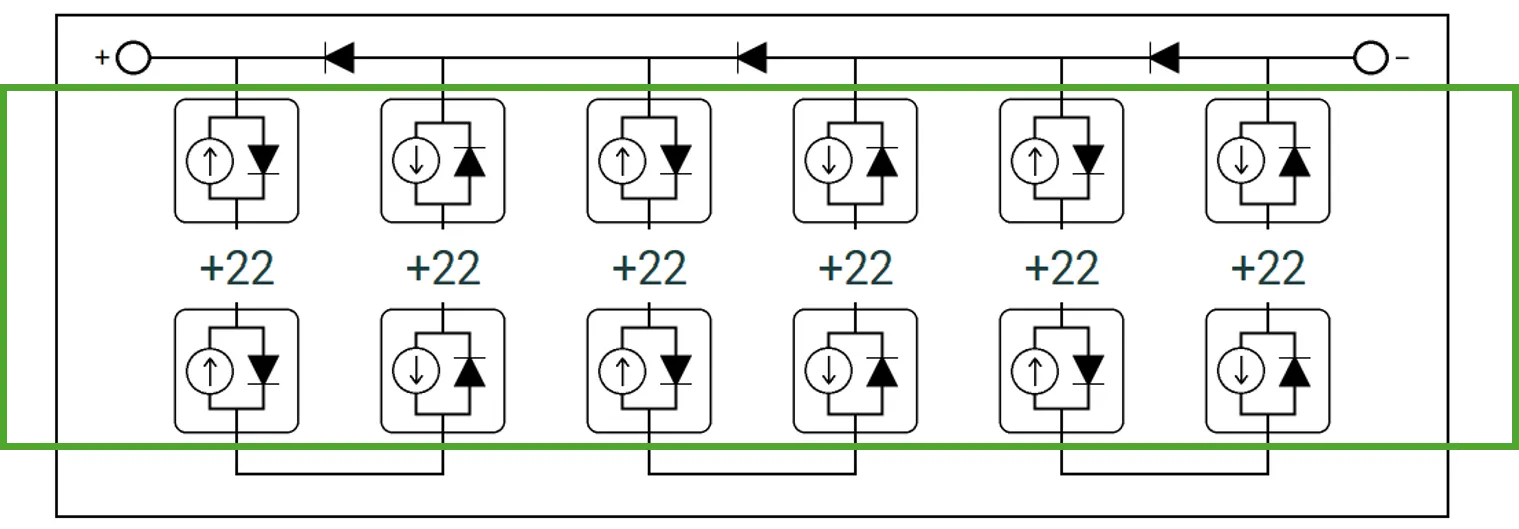
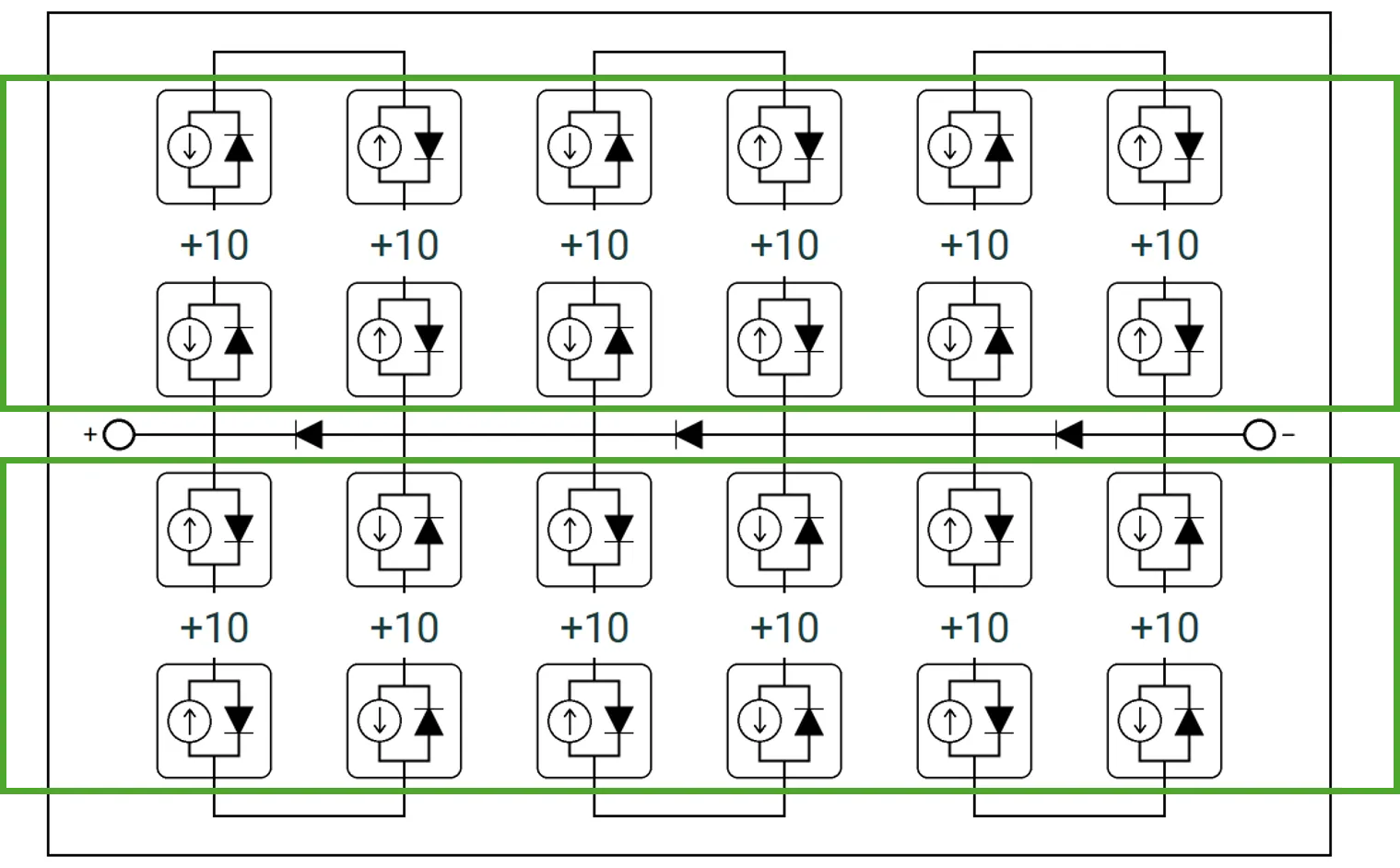
Left: 1 active row per column. Right: 2 active rows per column.
When additional columns are added, they include active rows with no solar cells in them. These can be configured using the string component editor — see string components below.
Each cell string in the circuit diagram shows arrows indicating the current flow direction. Clicking on a cell string in a cell column toggles its direction between up and down.
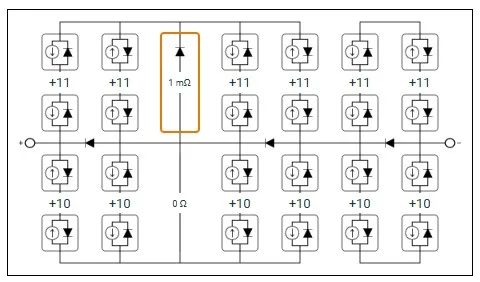
The example below shows a circuit with 7 columns. The third column has been set to have an up-facing bypass diode with a 1 mΩ series resistance in the top active row, and a bus resistor in the bottom active row. The orange box around the component indicates that it is selected and can be edited using the string component controls.
String components
Section link: String componentsClicking on a string element in an added column selects it, highlighted with an orange border. The String component editor panel appears below the circuit diagram with the following controls.
Component type
Section link: Component typeThe Type dropdown sets the electrical behaviour of the selected string. The available options are:
-
Bus resistor: The string acts as a purely resistive connection. A Resistance input sets the ohmic resistance value. A resistance of 0 Ω represents a perfect short circuit (ideal bus bar). This is the default for new short-circuit columns.
-
Bypass diode ▲ (up) / Bypass diode ▼ (down): The string acts as a bypass diode with an associated series resistance. The diode uses the same model parameters configured in the bypass diodes section. The triangle indicates the current flow direction through the diode. A Series resistance input is shown to set the resistance in series with the diode.
-
Open circuit: The string is electrically disconnected — no current flows through it. This can be used to selectively disable individual strings within an added column.
Clicking the selected string again deselects it and hides the editor panel.
Terminals
Section link: TerminalsThe positive and negative terminals are the connection points of the module circuit. The positive terminal appears in the first column and the negative terminal appears in the last column of the connector grid.
To reposition a terminal, click on a different connector in the same column — the terminal moves to the clicked position and the previous location is reset to an open circuit. There is always exactly one positive terminal and one negative terminal in the circuit.
Show full circuit
Section link: Show full circuitWhen a module has many cells per substring, the circuit diagram displays a compressed view by default. Checking Show full circuit expands the diagram to show every cell individually. This may not render well for very large cell counts.
Bypass diodes
Section link: Bypass diodesEach substring in the module is protected by a bypass diode. The bypass diode model can be configured as either Simple or SPICE level 1. See the bypass diode model technical reference for the full equations.
Simple model
Section link: Simple modelThe simple bypass diode model uses two parameters:
SPICE level 1 model
Section link: SPICE level 1 modelThe SPICE level 1 model provides additional parameters for more accurate diode characterisation:
Exporting bypass diode IV curves
Section link: Exporting bypass diode IV curvesClick → get bypass diode IV(T) to compute and export the bypass diode IV curve at multiple temperatures as a CSV file. This includes both forward and reverse bias characteristics.
Layout presets
Section link: Layout presetsFor the Vertical strings circuit type, three preset buttons are available in the Circuit layout panel. These configure the circuit wiring topology to match common module designs without changing the number of cells:
Traditional layout
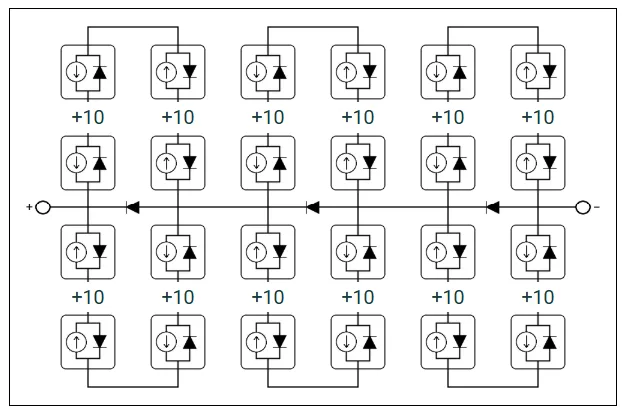
Section link: Traditional layoutThe → Set to Traditional layout button configures the standard vertical strings layout with 3 connector rows. This is the most common topology for crystalline silicon modules. Cells are arranged in vertical columns with alternating current flow directions. Each pair of adjacent columns forms a series-connected path, with bypass diodes protecting each substring.
U-bridge layout
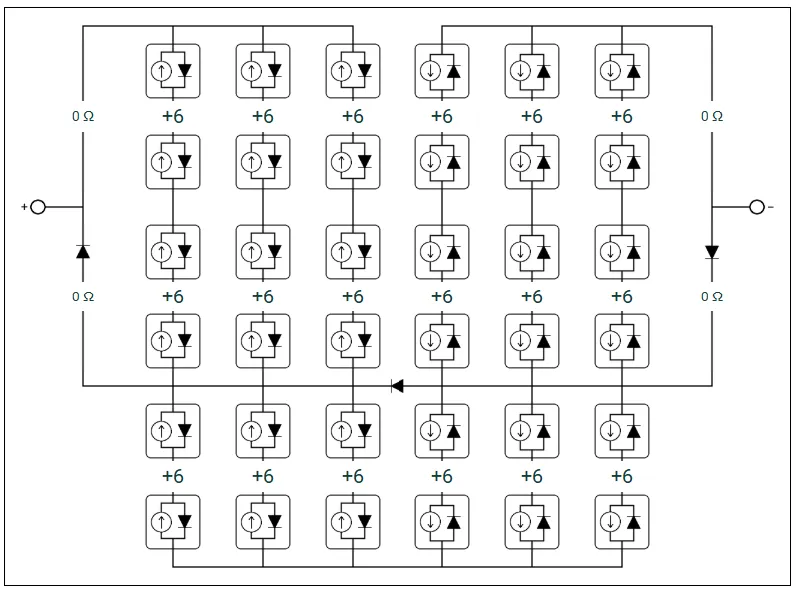
Section link: U-bridge layoutThe → Set to U-bridge layout button configures a U-bridge wiring topology with 4 connector rows (3 substrings per column). In this layout:
- Short-circuit columns are inserted at the left and right edges of the module
- The left half of the module has all current flowing upward, and the right half has all current flowing downward
- Terminals are positioned at the middle connector row
- Bypass diodes are placed at the boundary between the two halves and in the edge short-circuit columns
This topology is used in modules where the interconnection routing follows a U-shaped path from the middle of the module outward to one edge, then back through the other half.
4-split layout
Section link: 4-split layoutThe → Set to 4-split layout button configures a 4-split wiring topology with 3 connector rows (2 substrings per column). In this layout:
- Two short-circuit columns divide the cell columns into three groups
- The first group uses standard alternating current flow; the second and third groups use reversed flow
- Terminals are positioned at the middle connector row on the left and right edges
- Diodes are placed at the short-circuit column boundaries
This topology is used in modules with split interconnection schemes where the wiring is divided into multiple parallel paths.