
Module — Cell layout
The cell layout defines the number and position of the solar cells in the module, as well as the module dimensions.
The cell layout is defined on the Layout tab of the module popover, which appears when loading or previewing a module.
The cells are arranged in an XY grid and defined by the number of
- Columns and
- Rows .
Other inputs depend on whether the module is simple or complex. (Complex modules take considerably longer to solve and consume 10× of your simulation budget.)
Complex, Cell groupings,, space around cell groupings,, space between cells,, and space at the module perimeter. Module dimensions are calculated from the cell dimensions,, cell spacing,, and frame.
Simple modules
Section link: Simple modulesFor a simple module, the user defines the module dimensions:
- Width ,
- Length , and
- Thickness .
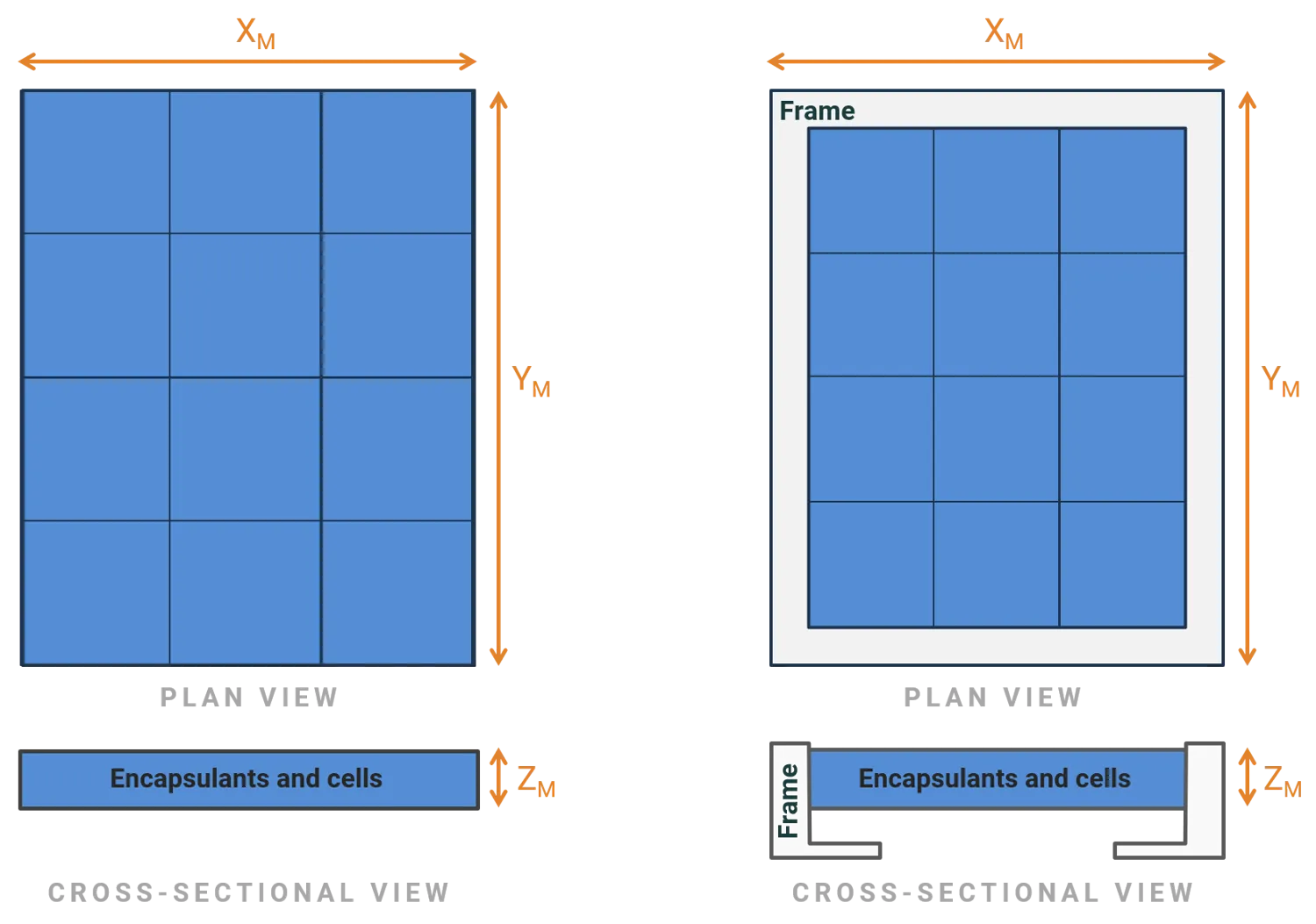
If the simple module does not have a frame, it is treated as a rectangular prism with these dimensions. The active area is the same as its total area.
If the simple module has a frame,
- and include the frame dimensions;
- the active area is reduced by the and dimensions of the frame; and
- is the combined thickness of the encapsulants and cells, but excludes the thickness of the frame.
With or without a frame, the active area of a simple module is divided into a grid of equal-sized cells with no space between or around the cells.
The figure below illustrates these rules. It depicts two simple modules with the same dimensions, , and , where the right-hand module has a frame and the left-hand module does not. The active area, shown in blue, is divided into three columns and four rows (, ). Notice that the module with the frame has smaller cells.
The optics of the active region are defined by the simple module optics.
The electrical connection between cells is described by the electrical layout.
Complex modules
Section link: Complex modulesFor a complex module, the layout inputs mirror those available in SunSolve Power and control the detailed physical arrangement of cells within the module. Cells are arranged in a grid, with the bottom-left cell labelled as X=0, Y=0. Columns and rows are always aligned.
Cell layout
Section link: Cell layoutThe cell layout inputs define how many cells the module contains and how they are arranged in the grid. All values are adjusted using increment/decrement buttons rather than free-text entry.
Columns
Section link: ColumnsThe number of columns of cells in the module.
The number of rows of cells in the module.
Total number of cells
Section link: Total number of cellsA read-only output calculated as columns multiplied by rows.
Cell spacing
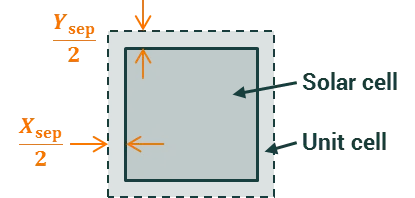
Section link: Cell spacingCell spacing defines the gap between adjacent cells. This space is filled by the same layer materials (e.g., encapsulant and backsheet) as defined on the Layers tab, and directly affects the optical simulation — light entering the cell gap region interacts with the inter-cell materials rather than the active cell area.
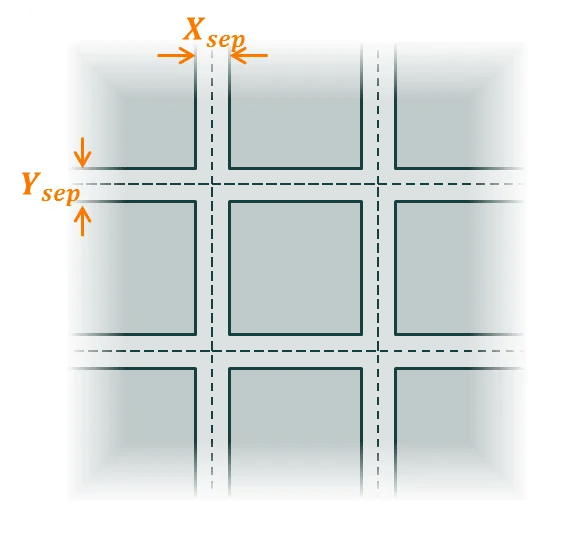
The figure below shows how the user inputs, and , define the distance between the edge of the solar cell and the edge of the unit cell. (The solar cell and the unit cell are concentric.)
Cell groups
Section link: Cell groupsEnabling cell groups divides the module’s cells into groups with additional spacing between them. This is a purely optical input — it adds extra inter-cell gap material between groups of cells without changing the electrical circuit topology.
Cell groups are useful for modelling modules where physical gaps exist between blocks of cells, such as half-cut cell modules with a gap along the centreline, or modules with visible spacing between cell groups for aesthetic reasons.
When cell groups are enabled, the following inputs appear:
- Groups per row — the number of cell groups in the X direction
- Groups per column — the number of cell groups in the Y direction
- X separation — the extra spacing between groups in the X direction, shown only when there is more than one group per row
- Y separation — the extra spacing between groups in the Y direction, shown only when there is more than one group per column
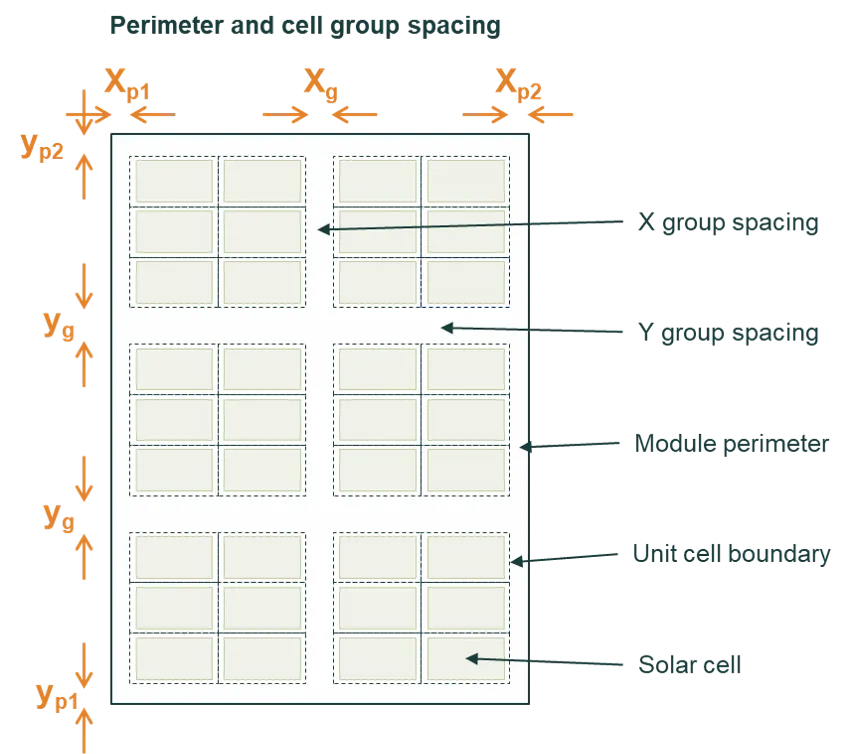
The group spacing and is in addition to the standard cell spacing. It does not add extra space to the module perimeter.
Module perimeter
Section link: Module perimeterIncluding a perimeter adds space around the outermost cells of the module. This perimeter region uses the same layer structure as the inter-cell gap. Four values can be set independently:
- Left
- Right
- Bottom
- Top
The perimeter is distinct from the frame, which sits outside the active module area. The perimeter defines the gap between the outermost cells and the frame (or module edge if no frame is present). The layers, materials, and interfaces within the perimeter region are the same as those within the cell-separation region of the unit cells, as defined on the Layers tab.
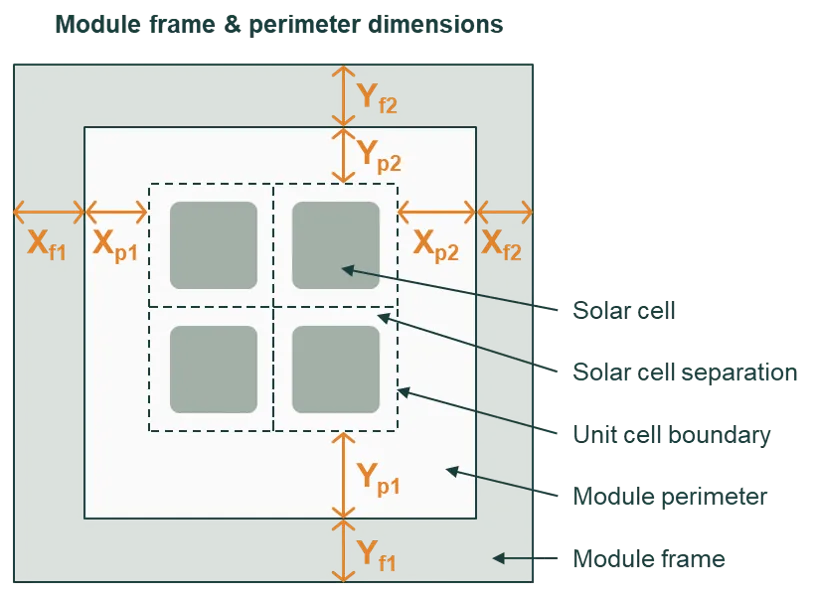
The figure below shows a module with 4 cells in each row and 9 cells in each column, grouped into 2 cell groups in the X direction and 3 cell groups in the Y direction. It illustrates how the cell group spacing, perimeter, and frame dimensions relate to each other.
Standard layouts
Section link: Standard layoutsSunSolve provides preset standard module layouts that can be loaded to quickly configure common module configurations. These presets set the cell count, spacing, and arrangement to match widely used module designs. Standard layouts are available when the inputs are not locked.
Calculated module dimensions
Section link: Calculated module dimensionsThe module preview section at the top of the module popover displays computed dimensions and areas based on the geometry inputs.
Single cell area
Section link: Single cell areaThe area of one cell, as determined by the cell shape and dimensions.
Total cell area
Section link: Total cell areaThe combined active area of all cells in the module is
where and are the number of columns and rows.
Cell gap area
Section link: Cell gap areaThe total area of non-cell regions inside the module perimeter — the inter-cell spacing, any cell group spacing, and any perimeter white space. This is the area filled by the encapsulant and backsheet layers. For a simple module this value is zero.
Frame area
Section link: Frame areaOnly shown when a frame is included. The total area occupied by the frame material around the module perimeter is
where and are the dimensions inside the frame (cells, spacing, and perimeter) and , , , are the frame widths on each side.
Module area
Section link: Module areaThe overall footprint of the module is
X dimension and Y dimension
Section link: X dimension and Y dimensionThe overall module dimensions. For a complex module these are built up from the cell and spacing inputs,
where and are the number of cell groups (1 when cell groups are disabled), and are the group spacings, , , , and are the perimeter values (0 when the perimeter is disabled), and , , , and are the frame widths (0 when there is no frame).
For a simple module, the X and Y dimensions are directly entered as and (plus any frame widths if a frame is included).